

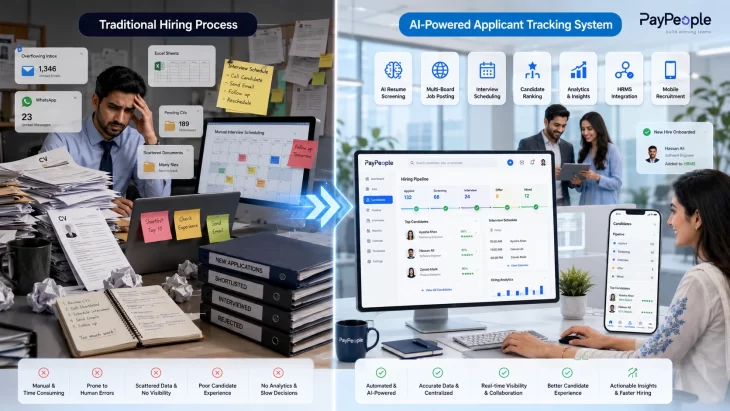
Traditional hiring vs AI-powered Applicant Tracking System for Pakistani businesses.

Quick Answer

An Applicant Tracking System (ATS) is software that manages every stage of hiring — job posting, resume collection, candidate screening, interview scheduling, and offer management — in one place. For companies in Pakistan hiring across Karachi, Lahore, and Islamabad simultaneously, an ATS replaces scattered WhatsApp groups, email inboxes, and Excel sheets with one searchable, auditable hiring pipeline.

Definition Box

Applicant Tracking System (ATS): A recruitment software platform that automates the collection, sorting, and tracking of job applicants throughout the hiring pipeline, from job posting through to offer letter.

What Is an ATS?

An ATS is the digital front door to your company’s hiring process. Instead of a recruiter manually opening 200 emailed CVs for one Lahore-based sales role, the system collects them automatically, extracts candidate details, ranks them against the job requirements, and hands the recruiter a shortlist.

It sits between your job advertisement and your onboarding process. Everything that happens to a candidate — application, screening, interview, offer, rejection — is logged, timestamped, and searchable later.
How an ATS Actually Works

  1. A hiring manager raises a requisition — role, skills needed, department, city.
  2. The job posts to multiple boards (Rozee.pk, LinkedIn, careers page) from one dashboard.
  3. The ATS parses each resume into structured fields — education, experience, skills.
  4. Candidates are ranked against the role’s criteria.
  5. Recruiters shortlist and schedule interviews, often with self-service booking links.
  6. An offer is generated, and the hired candidate’s data moves into onboarding without re-typing anything.
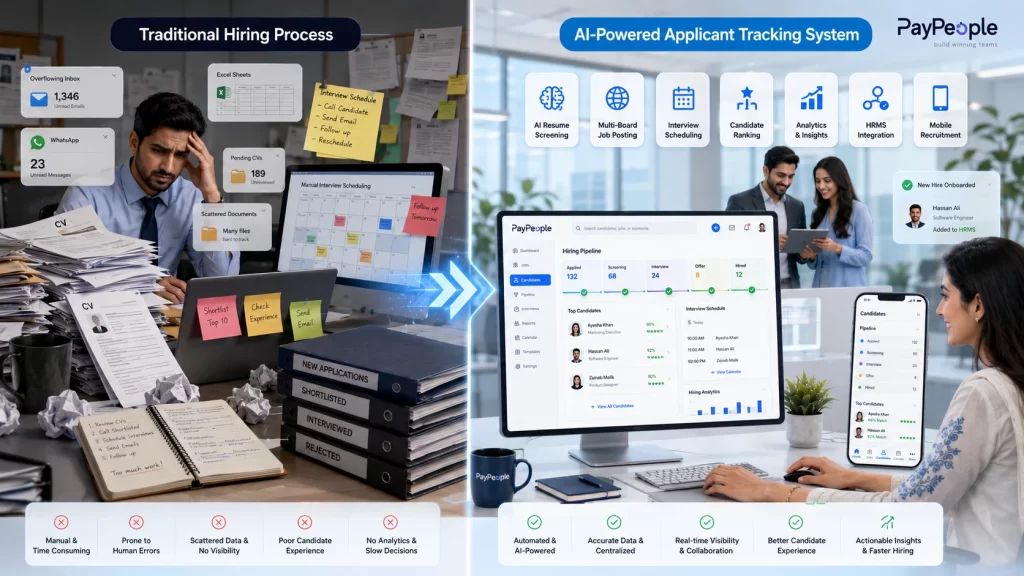
Traditional hiring vs AI-powered Applicant Tracking System for Pakistani businesses.
Traditional recruitment compared with an AI-powered Applicant Tracking System that automates screening, interviews, and onboarding.

ATS vs HRIS vs Recruitment CRM

A common point of confusion, so here’s the distinction in one table.

SystemCore JobWhen You Use It
ATSManages candidates before they’re hiredDuring active recruitment only
HRIS/HRMSManages employees after they’re hired (payroll, leave, attendance)Throughout employment
Recruitment CRMNurtures passive candidates and talent pools before a role even opensLong-term talent pipelining

Most Pakistani businesses don’t need all three as separate tools — a unified HR platform with a built-in ATS module (like PayPeople’s Applicant Tracking System) avoids the data re-entry that comes from stitching three vendors together.

Types of ATS Compared

TypeBest ForTrade-off
Cloud-based / SaaSMost SMEs and mid-size companiesOngoing subscription cost
On-premiseBanks, regulated sectors needing data on local serversHigh setup and maintenance cost
Enterprise ATS500+ employee organizations with layered approval chainsOverkill for smaller teams
Standalone ATSCompanies happy to manage a separate HR systemManual data transfer at hiring
Integrated ATS (part of an HRMS)Companies that want hire-to-retire in one recordFewer third-party integrations

Why Pakistani Employers Need One in 2026

Three shifts make ATS adoption more urgent for Pakistani companies now:

  • Application volume has exploded. A mid-level opening posted on Rozee.pk or LinkedIn in Karachi or Lahore can draw hundreds of applications within days, most not meeting the core requirement.
  • Multi-city hiring is normal. Companies hiring across Lahore, Karachi, and Islamabad need one shared pipeline, not three disconnected inboxes across regional HR teams.
  • AI is reshaping required skills. Roughly a quarter of jobs in Pakistan are expected to change in nature over the next couple of years as automation reshapes what “qualified” means, a trend echoed in the World Economic Forum’s Future of Jobs Report recruitment software needs to evaluate skills, not just keyword-match titles.

A recorded, timestamped hiring trail also protects employers if a rejected candidate disputes the process, and simplifies documentation during audits.

Key Features Checklist

  • Resume parsing and structured candidate profiles
  • Multi-board job posting from one dashboard
  • Keyword and skills-based filtering
  • Interview scheduling with calendar sync
  • Collaborative scorecards for hiring panels
  • Automated candidate email/SMS updates
  • Reporting on time-to-hire and source effectiveness
  • Direct handoff into onboarding and HR records
  • Mobile access for recruiters and candidates
  • Role-based data access and audit logs

AI in Recruitment: What’s Actually Changed

AI-powered ATS platforms in 2026 go beyond keyword matching. They score candidates against the actual competencies a role needs and flag likely drop-off risks before a candidate goes cold. PayPeople’s AI-powered recruitment and onboarding agent applies this to local hiring — ranking applicants by fit rather than how well their CV happens to be worded. The same AI approach carries through after hiring too, with PayPeople’s AI-driven performance management tools picking up where recruitment leaves off, so the skills data collected at hiring stage doesn’t go to waste once someone joins.

The honest caveat: AI screening still depends on how well a job’s requirements are defined upfront. Vague criteria produce vague shortlists. Treat AI as a filter that narrows 300 applicants to 30 — not a replacement for a recruiter’s final judgment.

How to Choose the Right ATS (Decision Framework)

Work through these questions in order:

  1. How many people do you hire per quarter? Under 10 → a lightweight tool may suffice. 10+ across multiple cities → you need real workflow automation.
  2. Does it need to talk to your HR/payroll system? If yes, prioritize a unified platform over a standalone ATS to avoid duplicate entry.
  3. Who needs access? Confirm role-based permissions for hiring managers, HR, and finance.
  4. What’s your realistic training runway? A modern interface needs a day; a legacy on-premise system can need weeks.
  5. What does post-go-live support look like? Ask specifically about local (Pakistan time zone) response times.

For a side-by-side look at how the leading platforms stack up on these points, see our breakdown of the best ATS tools for 2026.

Common Mistakes to Avoid

  • Buying features you’ll never use — enterprise-grade approval chains add friction for a 40-person company, not value.
  • Ignoring candidate experience — a clunky application form loses good candidates before they apply.
  • Setting screening keywords too narrowly — overly specific filters silently reject qualified people whose CVs are simply worded differently.
  • Skipping the integration check — an ATS that can’t pass hired-candidate data into payroll and HR records recreates the manual work you were trying to remove.

Pros and Cons

Pros: Faster time-to-hire, centralized candidate data, better hiring-panel collaboration, cleaner compliance trail, reduced manual admin.

Cons: Upfront setup and training time, risk of over-filtering strong candidates if criteria are poorly configured, subscription cost for smaller teams.

Key Takeaways

  • An ATS automates hiring from job posting through to offer, not just resume storage.
  • It’s distinct from an HRIS (employees after hiring) and a recruitment CRM (future candidates).
  • Multi-city Pakistani companies benefit most from a unified, cloud-based ATS tied into their broader HR system.
  • AI narrows large applicant pools faster but still depends on well-defined job criteria.
  • Choose based on hiring volume and integration needs — not just feature count.

Conclusion

An ATS isn’t just a resume filing cabinet — it’s the operational backbone of hiring for any Pakistani business fielding real application volume across multiple cities. The right choice depends less on feature count and more on whether it fits your hiring volume, integrates with your existing HR and payroll systems, and gives your team a shortlist they can trust. PayPeople’s Recruitment Management module, backed by AI-powered screening, connects hiring directly into payroll, attendance, and performance management — so a hired candidate’s data never needs re-entering.

Ready to see it in action? Book a free PayPeople demo and walk through your own hiring pipeline with our team.

Frequently Asked Questions

What is an Applicant Tracking System in simple terms?

Software that automates hiring — collecting applications, screening candidates, and tracking them to an offer, in one dashboard.

Is an ATS the same as HR software?

No. An ATS manages candidates before hiring; HR software manages employees after they join, covering payroll, attendance, and leave.

Can an ATS integrate with payroll software?

A good one should. PayPeople's ATS passes hired-candidate data straight into payroll and HR records, removing duplicate entry

How does AI improve ATS screening?

It ranks candidates by actual skill match rather than keyword presence, and can flag pipeline drop-off risks early.

How long does setup take?

A cloud-based system can go live within days; heavily customized enterprise systems can take weeks.

Can one ATS handle hiring across Karachi, Lahore, and Islamabad at once?

Yes — a cloud-based ATS gives every city's HR team the same live pipeline instead of separate spreadsheets.

Is a free ATS good enough for growing companies?

Free tools cover basic postings but usually lack integrations and reporting — fine early on, limiting once volume grows.