

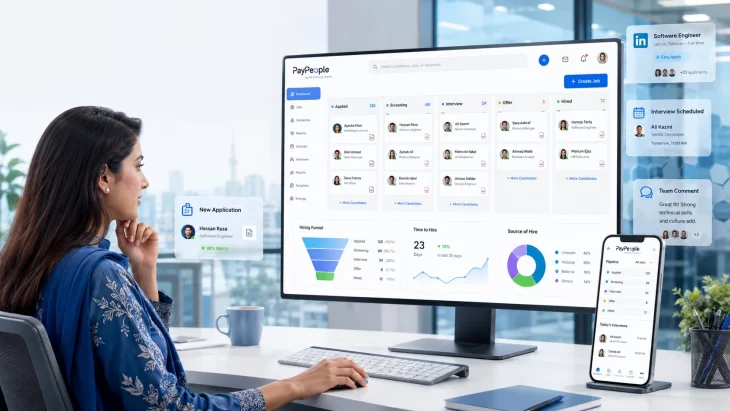
Pakistani HR recruiter using PayPeople's Applicant Tracking System dashboard to manage candidate screening, interviews, and hiring workflow in 2026.

Quick Answer

Choosing the right Applicant Tracking System in Pakistan comes down to one thing most feature lists don’t mention: how usable the interface actually is day to day. Most ATS platforms sold in Pakistan have similar core features on paper — job posting, resume parsing, interview scheduling. What separates a good one from a frustrating one is how fast a recruiter can move a candidate from “applied” to “hired” without fighting the software. PayPeople’s Applicant Tracking System is built around that single problem, with a dashboard recruiters can run entirely without training documentation.

If you’re still deciding whether you need an ATS at all, or how to compare one against an HRIS or recruitment CRM, our complete ATS buyer’s guide covers that ground in detail. This article picks up from there — it’s about what makes an ATS interface genuinely usable day to day, and how PayPeople’s is built.

Why an Applicant Tracking System in Pakistan Needs the Right Interface, Not Just Features

Two ATS platforms can have an identical feature list and produce completely different hiring experiences. A recruiter juggling 40 open roles across Lahore, Karachi, and Islamabad doesn’t have time to hunt through five menus to find a candidate’s CV, or wait for a page to reload every time they leave a comment. The interface is where hiring speed is won or lost — not in the feature brochure.

Three things tend to go wrong with a poorly designed Applicant Tracking System in Pakistan in practice:
  • Navigation buries common tasks. Shortlisting a candidate or rescheduling an interview takes multiple clicks through unrelated menus.
  • Feedback gets lost. Interviewers leave scattered comments in email or WhatsApp instead of a structured scorecard, so hiring decisions become subjective and hard to defend later.
  • Mobile is an afterthought. Recruiters and hiring managers in Pakistan increasingly review candidates from their phones between meetings — a desktop-only interface slows the whole pipeline down.

Inside PayPeople’s ATS: How the Workflow Actually Runs

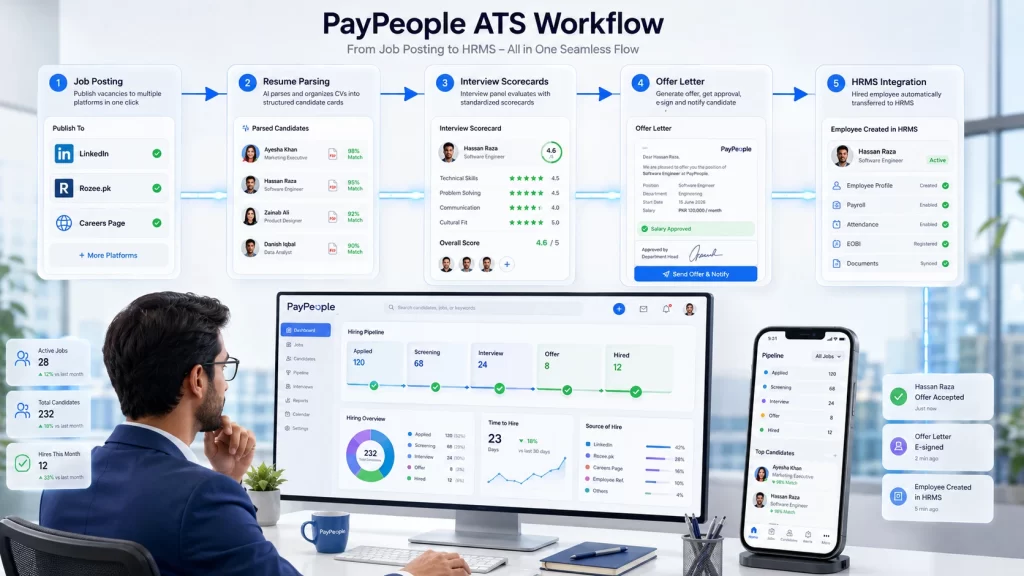
PayPeople Applicant Tracking System workflow showing job posting, AI resume parsing, interview scorecards, digital offer letters, and automatic HRMS integration for recruitment in Pakistan.
  1. Post once, reach everywhere — Create a job requisition inside PayPeople and publish it simultaneously to LinkedIn, Rozee.pk, and your own careers page.
  2. Let parsing do the first pass — Resumes are automatically parsed and structured, so recruiters start from a filtered shortlist instead of 200 raw CVs.
  3. Run interviews with structured scorecards — Every panel member fills a digital scorecard tied to the role’s actual criteria, so feedback is comparable across interviewers instead of a string of subjective opinions.
  4. Generate and send offers digitally — Pick an approved template, adjust the salary in PKR, and send it for e-signature from inside the same dashboard.
  5. Hand off without re-typing anything — Accepting an offer moves the candidate’s data straight into PayPeople’s HRMS for payroll and EOBI registration — no duplicate data entry.

What to Look For in an ATS Interface (Practical Checklist)

  • Can a recruiter shortlist, message, and schedule a candidate without leaving one screen?
  • Do interview scorecards produce a comparable score across panel members, or just free-text notes?
  • Is the mobile experience a genuine app-like interface, or a shrunk-down desktop site?
  • Does moving a hired candidate into payroll/HRMS require any manual re-entry?
  • How long does a new recruiter actually need before they’re productive — hours, or days?

Pro tip: Push your hiring panel to submit digital scorecards within two hours of an interview. Same-day feedback is what actually shortens time-to-hire — not the number of features in the platform.

Talk to PayPeople

  • 🎯 Request a demo
  • 💬 Chat on WhatsApp — +92 300 0800498
  • ✉️ Email via the contact page on paypeople.pk
  • 📍 Office: 384-E, Ali Center Plaza, 1st Floor, Johar Town, Lahore, Pakistan

Frequently Asked Questions

Does a more feature-rich ATS always mean a better one?

Not necessarily. A platform with more features but a cluttered interface can slow recruiters down more than a simpler tool they can navigate instantly. Prioritize how fast your team can complete the core loop — post, screen, interview, offer — over total feature count.

Can recruiters manage hiring entirely from a phone with PayPeople?

Yes. Recruiters can review CVs, leave interview feedback, and move candidates through the pipeline from a mobile-optimized interface, and candidates can apply directly from their phones as well.

How does PayPeople keep interview feedback from turning into duplicate one-on-one email threads?

Every panel member submits feedback through a shared digital scorecard tied to the role's criteria, so all feedback lives in one place, tagged to the candidate, instead of scattered across email and WhatsApp

Does hiring in PayPeople's ATS automatically set up payroll for a new hire?

Yes — accepting an offer moves the candidate's record directly into PayPeople's HRMS, including EOBI registration, without re-entering their details.

Is it worth switching ATS platforms just for a better interface?

If your team is regularly working around the software — exporting to spreadsheets, tracking feedback outside the system, or avoiding mobile use — the lost time usually outweighs a migration's setup cost. If your current tool covers the basics smoothly, a switch may not be necessary.