

By Asia Aziz (HR & Payroll Technology Specialist) – 3 years implementing payroll & HRMS platforms for Pakistani SMBs. https://www.linkedin.com/in/asia-aziz-a07459269/
An HRMS portal is a single online platform where employees and HR teams handle payroll, leave, attendance and records – instead of chasing paper forms or Excel sheets. If you’re a Pakistani business owner or HR manager still juggling spreadsheets, this guide walks you through exactly what it does and how to pick one.
An HRMS portal (Human Resource Management System portal) is a web-based application that centralizes every core HR function – payroll, attendance, leave, employee records and compliance – into one login.
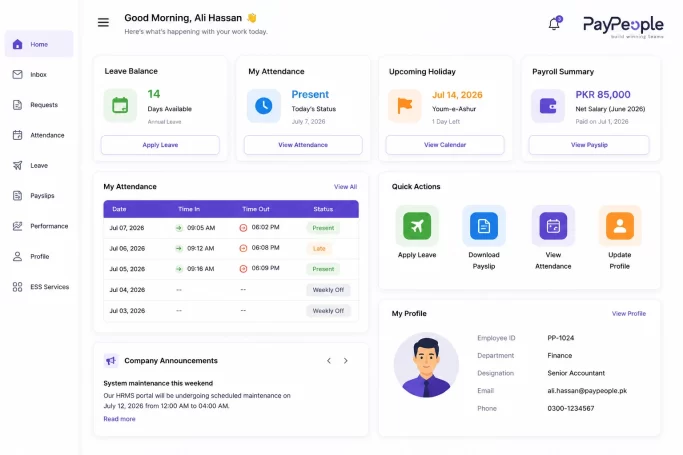
Think of it as the digital front desk of your HR department. Employees log in to check payslips or apply for leave. HR staff log in to run payroll or pull a headcount report. No paper trail, no back-and-forth emails.
The term HRMS is often used loosely alongside HRIS (Human Resource Information System) and HCM (Human Capital Management). TechTarget’s comparison notes that an HRMS builds on core HRIS record-keeping by adding talent-management modules like recruiting, onboarding and performance tracking – so it’s the broader, more capable of the three.
In practice, for a Pakistani SMB, “HRMS portal,” “HR portal,” and “HRMS software” mean roughly the same thing: one system, accessible from a browser or app, replacing manual HR paperwork.
A proper HRMS portal should cover these bases at minimum:
Not every vendor bundles all of these. Some tools focus purely on payroll; others are full HR portal suites. Match the feature list to what you actually need before you sign anything.
Here’s what changes on the ground once a business switches from spreadsheets to an HRMS portal:
1. Fewer payroll errors, faster payroll runs. Manual salary calculations across allowances, deductions, EOBI, and income tax slabs are where most errors creep in. Automating this cuts processing time from days to hours for a mid-sized team.
2. Built-in compliance with local law. Under Pakistan’s EOBI Act, any establishment with 5 or more employees must register, contribute monthly (5% employer, 1% employee of minimum wage), and file by the 15th of the following month. A good HRMS tracks these deadlines automatically instead of relying on someone remembering.
3. Lower administrative cost. Digitizing payroll and leave management is already the most adopted HR function in Pakistan – payroll digitization runs close to 78% among organizations that have moved online, according to industry surveys, because the ROI shows up fast in reduced admin hours.
4. Better data for decisions. Turnover, attendance trends, and headcount cost – all visible in one dashboard instead of scattered across files.
5. Happier employees. Self-service means staff aren’t waiting on HR for a payslip copy or leave approval. That alone reduces friction in day-to-day HR interactions.
6. Scales with growth. Adding a new branch or 20 new hires shouldn’t mean rebuilding your HR process from scratch. A cloud HRMS scales without extra headcount in HR.

Here’s the typical rollout, based on how most SMBs in Pakistan implement an HRMS portal:
Most businesses see the system running end-to-end within 2–4 weeks, assuming employee data is reasonably organized before migration.
Before implementing any HRMS portal, it’s important to understand the complete HR management process, including recruitment, onboarding, attendance, payroll, performance management, and employee offboarding. Learning these stages helps businesses configure HR software more effectively.
One of the most common payroll mistakes we see is incorrect attendance synchronization. If attendance devices are not configured properly, overtime and late arrivals can be calculated incorrectly, leading to salary disputes.
This is where a lot of business owners get confused. They’re related, but not the same thing.
| Payroll Software | HRMS Portal | |
|---|---|---|
| Scope | Salary calculation, tax, and payslips only | Full employee lifecycle: hiring to exit |
| Self-service | Rarely, or limited to payslip download | Full self-service: leave, attendance, profile updates |
| Compliance tracking | Tax and EOBI calculations | Tax, EOBI, PESSI/SESSI, plus HR policy compliance |
| Reporting | Payroll cost reports | Workforce analytics: turnover, attendance, headcount |
| Best for | Very small teams needing just salary processing | Growing businesses needing HR + payroll in one place |
Our Take: Our Take
While payroll software is useful for salary processing, an HRMS portal provides a more complete solution by managing attendance, leave, employee records, and payroll in one centralized platform. For growing businesses, this reduces manual work and improves efficiency.
A few things worth checking before you commit to any HRMS software:
If you’re evaluating options for your business, PayPeople is built specifically for Pakistani payroll and HR compliance – EOBI, PESSI/SESSI, and tax rules included by design, not bolted on later. You can try PayPeople with a live demo before committing.
Yes, in everyday use. "HRMS," "HRMS software," and "HR portal" are used interchangeably to describe a system that digitizes payroll, attendance, leave, and employee records.
Pricing is usually per-employee, per-month. Smaller teams (under 50 employees) typically pay less per head than large enterprises, since most vendors offer tiered pricing. Get a quote based on your exact headcount rather than relying on published starting prices.
Yes. Once you cross 5 employees, EOBI registration becomes mandatory anyway, so an HRMS portal that automates that compliance step often pays for itself immediately.
Reputable vendors host data on secure cloud servers with role-based access, meaning only authorized HR staff see sensitive information like salary or CNIC details. Always confirm the vendor's data hosting and backup policy before signing up.
Most SMBs go live in 2–4 weeks, depending on how organized existing employee data is before migration.
Usually yes, for tax filing and financial statements. The HRMS handles payroll calculation and compliance tracking, but your accountant or tax consultant still manages annual filings and broader financial reporting.
